
🎉 We just launched 3 new features! Find out more:

Debugger
AI Translation
AI Rephrase
blog single image
blog single image
What's New

Introducing FlowAI Insights: Understand What’s Working, What’s Not, and Where to Focus Next

blog author
Lauren Smith

Customer-obsessed teams don’t have a data problem. They have a clarity problem.

Analytics dashboards are valuable, but rarely surface what teams should do next in real time. Event tracking shows where. But answering questions like why users are stuck or what to fix next still requires time, interpretation, and guesswork.

That’s why we’re excited to introduce FlowAI Insights, a new AI-powered capability in Userflow that helps teams understand what’s really happening in their product, automatically.

Why we built FlowAI Insights

As teams and companies grow, so does the volume of data they collect. But more data doesn’t automatically lead to better decisions.

We consistently saw teams (including ourselves!) investing in analytics tools, event tracking, and dashboards, yet still struggling to answer the same core questions: where users were getting stuck, which experiences were actually driving adoption, and what to focus on next.

The problem wasn’t access to information. It was the effort required to turn that information into clarity.

We built FlowAI Insights to remove that friction. Instead of asking teams to start with dashboards and filters, FlowAI Insights starts with interpretation—surfacing the patterns and signals that matter most so teams can move forward with confidence.

What FlowAI Insights Does Differently

FlowAI Insights looks at real product usage and translates it into clear, actionable insight.

Animated GIF of FlowAI Insights - showing an insight and then fixing the issue

Rather than requiring teams to define every metric upfront, it analyzes how users move through key experiences and highlights where engagement is strong and where friction appears. It surfaces trends, not just events, helping teams understand what’s happening across the product, not just what happened in a single moment.

The result is faster clarity without the cognitive overhead of traditional analytics. Teams spend less time interpreting charts and more time deciding what to improve, test, or iterate on next.

Designed for How Teams Actually Operate

Teams move fast, and insights need to keep up.

FlowAI Insights fits naturally into the way teams already work, including reviewing onboarding effectiveness and identifying friction before it turns into churn.

Because it works alongside the in-app experiences you build with Userflow, insights are directly connected to real user journeys, not abstract metrics.

That means less time interpreting charts, and more time improving the product.
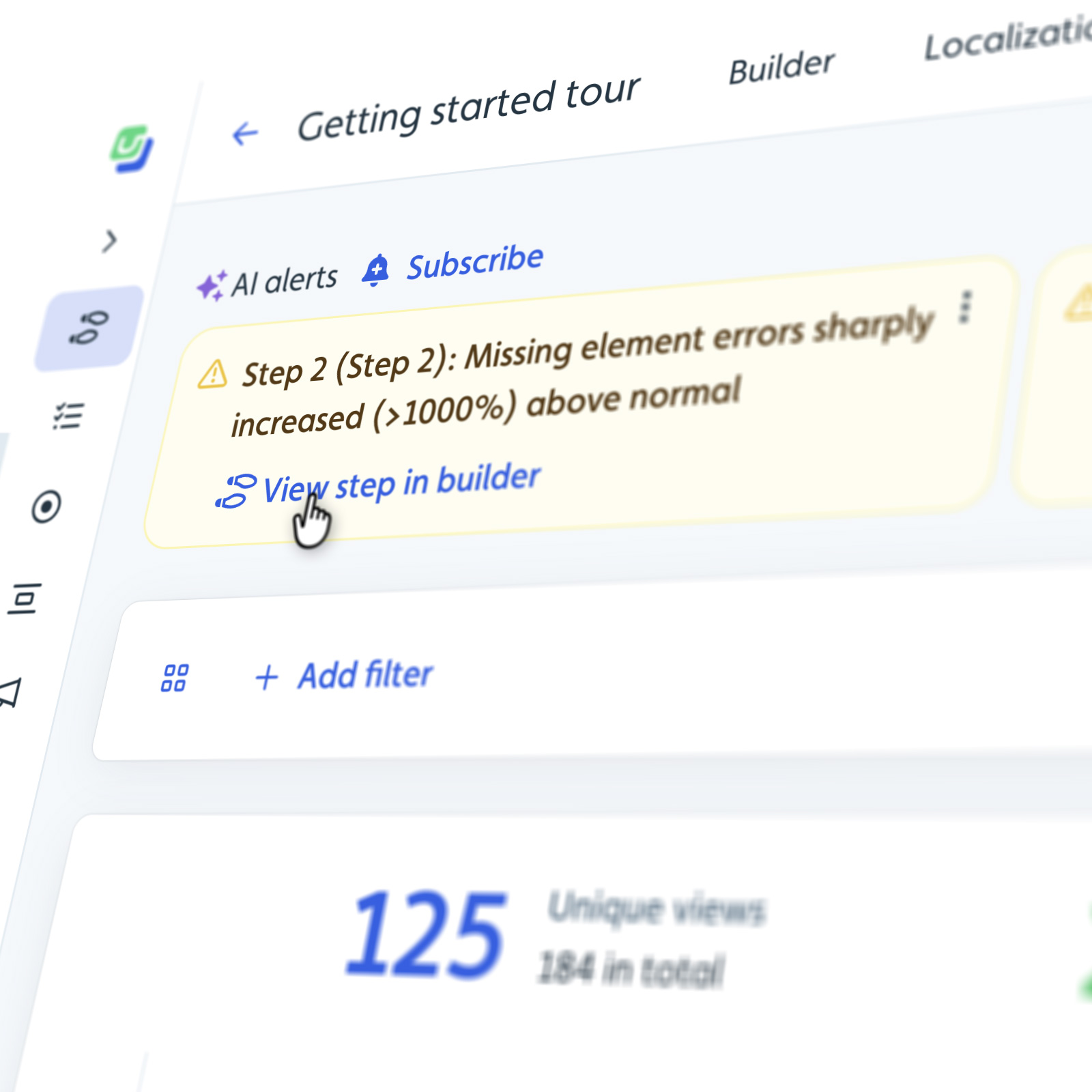
FlowAI Insight show an element error

Part of the Broader FlowAI Platform

FlowAI Insights is one part of FlowAI, Userflow’s AI platform built to help teams understand users and act faster.

FlowAI brings together:

  • AI-powered insights to understand product behavior
  • AI assistance to support users in-app and improve self-serve
  • New capabilities coming soon, including deeper assistant insights and AI-powered creation tools

Together, FlowAI helps teams close the loop between learning from users and improving their experience.

Getting Started Is Simple

FlowAI Insights is now live on Userflow’s Pro and Enterprise plans.

If you’re already a customer, you can start exploring insights in your account today. If you’re new to Userflow, you can start a free trial and see FlowAI Insights work with your own product data.

👉 Start your free trial

Want to see it live in action? If you want a closer look at how FlowAI Insights works, we’re hosting a live walkthrough where we’ll share real examples and talk through how teams are using insights to guide product decisions.

During the session, we’ll cover how FlowAI Insights identifies friction and engagement, how it fits into existing workflows, and what’s coming next across the FlowAI platform. Join us → 

Looking Ahead: What’s Coming Next for FlowAI

FlowAI Insights is the first step in a broader vision for how teams understand and improve the product experience.

In February, we’ll be expanding FlowAI with two major additions:

  • FlowAI Assistant Insights will give teams visibility into how their AI assistant is actually performing—what questions users ask, where answers fall short, and where content gaps exist. Instead of guessing whether self-serve is working, teams will be able to see exactly how users interact with the assistant and where improvements will have the biggest impact.
  • AI Theme Builder will help teams move from insight to action even faster. By analyzing product context and usage patterns, it will assist in generating onboarding and guidance themes, thus reducing the time it takes to create meaningful in-app experiences.

Together, these additions continue the same theme: helping teams spend less time interpreting signals and more time improving the product. Stay tuned for more information! 

2 min 33 sec. read

blog single image
What's New

Introducing FlowAI Insights: Understand What’s Working, What’s Not, and Where to Focus Next

blog author
Lauren Smith

Customer-obsessed teams don’t have a data problem. They have a clarity problem.

Analytics dashboards are valuable, but rarely surface what teams should do next in real time. Event tracking shows where. But answering questions like why users are stuck or what to fix next still requires time, interpretation, and guesswork.

That’s why we’re excited to introduce FlowAI Insights, a new AI-powered capability in Userflow that helps teams understand what’s really happening in their product, automatically.

Why we built FlowAI Insights

As teams and companies grow, so does the volume of data they collect. But more data doesn’t automatically lead to better decisions.

We consistently saw teams (including ourselves!) investing in analytics tools, event tracking, and dashboards, yet still struggling to answer the same core questions: where users were getting stuck, which experiences were actually driving adoption, and what to focus on next.

The problem wasn’t access to information. It was the effort required to turn that information into clarity.

We built FlowAI Insights to remove that friction. Instead of asking teams to start with dashboards and filters, FlowAI Insights starts with interpretation—surfacing the patterns and signals that matter most so teams can move forward with confidence.

What FlowAI Insights Does Differently

FlowAI Insights looks at real product usage and translates it into clear, actionable insight.

Animated GIF of FlowAI Insights - showing an insight and then fixing the issue

Rather than requiring teams to define every metric upfront, it analyzes how users move through key experiences and highlights where engagement is strong and where friction appears. It surfaces trends, not just events, helping teams understand what’s happening across the product, not just what happened in a single moment.

The result is faster clarity without the cognitive overhead of traditional analytics. Teams spend less time interpreting charts and more time deciding what to improve, test, or iterate on next.

Designed for How Teams Actually Operate

Teams move fast, and insights need to keep up.

FlowAI Insights fits naturally into the way teams already work, including reviewing onboarding effectiveness and identifying friction before it turns into churn.

Because it works alongside the in-app experiences you build with Userflow, insights are directly connected to real user journeys, not abstract metrics.

That means less time interpreting charts, and more time improving the product.

FlowAI Insight show an element error

Part of the Broader FlowAI Platform

FlowAI Insights is one part of FlowAI, Userflow’s AI platform built to help teams understand users and act faster.

FlowAI brings together:

  • AI-powered insights to understand product behavior
  • AI assistance to support users in-app and improve self-serve
  • New capabilities coming soon, including deeper assistant insights and AI-powered creation tools

Together, FlowAI helps teams close the loop between learning from users and improving their experience.

Getting Started Is Simple

FlowAI Insights is now live on Userflow’s Pro and Enterprise plans.

If you’re already a customer, you can start exploring insights in your account today. If you’re new to Userflow, you can start a free trial and see FlowAI Insights work with your own product data.

👉 Start your free trial

Want to see it live in action? If you want a closer look at how FlowAI Insights works, we’re hosting a live walkthrough where we’ll share real examples and talk through how teams are using insights to guide product decisions.

During the session, we’ll cover how FlowAI Insights identifies friction and engagement, how it fits into existing workflows, and what’s coming next across the FlowAI platform. Join us → 

Looking Ahead: What’s Coming Next for FlowAI

FlowAI Insights is the first step in a broader vision for how teams understand and improve the product experience.

In February, we’ll be expanding FlowAI with two major additions:

  • FlowAI Assistant Insights will give teams visibility into how their AI assistant is actually performing—what questions users ask, where answers fall short, and where content gaps exist. Instead of guessing whether self-serve is working, teams will be able to see exactly how users interact with the assistant and where improvements will have the biggest impact.
  • AI Theme Builder will help teams move from insight to action even faster. By analyzing product context and usage patterns, it will assist in generating onboarding and guidance themes, thus reducing the time it takes to create meaningful in-app experiences.

Together, these additions continue the same theme: helping teams spend less time interpreting signals and more time improving the product. Stay tuned for more information! 

2 min 33 sec. read

Customer-obsessed teams don’t have a data problem. They have a clarity problem.

Analytics dashboards are valuable, but rarely surface what teams should do next in real time. Event tracking shows where. But answering questions like why users are stuck or what to fix next still requires time, interpretation, and guesswork.

That’s why we’re excited to introduce FlowAI Insights, a new AI-powered capability in Userflow that helps teams understand what’s really happening in their product, automatically.

Why we built FlowAI Insights

As teams and companies grow, so does the volume of data they collect. But more data doesn’t automatically lead to better decisions.

We consistently saw teams (including ourselves!) investing in analytics tools, event tracking, and dashboards, yet still struggling to answer the same core questions: where users were getting stuck, which experiences were actually driving adoption, and what to focus on next.

The problem wasn’t access to information. It was the effort required to turn that information into clarity.

We built FlowAI Insights to remove that friction. Instead of asking teams to start with dashboards and filters, FlowAI Insights starts with interpretation—surfacing the patterns and signals that matter most so teams can move forward with confidence.

What FlowAI Insights Does Differently

FlowAI Insights looks at real product usage and translates it into clear, actionable insight.

Animated GIF of FlowAI Insights - showing an insight and then fixing the issue

Rather than requiring teams to define every metric upfront, it analyzes how users move through key experiences and highlights where engagement is strong and where friction appears. It surfaces trends, not just events, helping teams understand what’s happening across the product, not just what happened in a single moment.

The result is faster clarity without the cognitive overhead of traditional analytics. Teams spend less time interpreting charts and more time deciding what to improve, test, or iterate on next.

Designed for How Teams Actually Operate

Teams move fast, and insights need to keep up.

FlowAI Insights fits naturally into the way teams already work, including reviewing onboarding effectiveness and identifying friction before it turns into churn.

Because it works alongside the in-app experiences you build with Userflow, insights are directly connected to real user journeys, not abstract metrics.

That means less time interpreting charts, and more time improving the product.

FlowAI Insight show an element error

Part of the Broader FlowAI Platform

FlowAI Insights is one part of FlowAI, Userflow’s AI platform built to help teams understand users and act faster.

FlowAI brings together:

  • AI-powered insights to understand product behavior
  • AI assistance to support users in-app and improve self-serve
  • New capabilities coming soon, including deeper assistant insights and AI-powered creation tools

Together, FlowAI helps teams close the loop between learning from users and improving their experience.

Getting Started Is Simple

FlowAI Insights is now live on Userflow’s Pro and Enterprise plans.

If you’re already a customer, you can start exploring insights in your account today. If you’re new to Userflow, you can start a free trial and see FlowAI Insights work with your own product data.

👉 Start your free trial

Want to see it live in action? If you want a closer look at how FlowAI Insights works, we’re hosting a live walkthrough where we’ll share real examples and talk through how teams are using insights to guide product decisions.

During the session, we’ll cover how FlowAI Insights identifies friction and engagement, how it fits into existing workflows, and what’s coming next across the FlowAI platform. Join us → 

Looking Ahead: What’s Coming Next for FlowAI

FlowAI Insights is the first step in a broader vision for how teams understand and improve the product experience.

In February, we’ll be expanding FlowAI with two major additions:

  • FlowAI Assistant Insights will give teams visibility into how their AI assistant is actually performing—what questions users ask, where answers fall short, and where content gaps exist. Instead of guessing whether self-serve is working, teams will be able to see exactly how users interact with the assistant and where improvements will have the biggest impact.
  • AI Theme Builder will help teams move from insight to action even faster. By analyzing product context and usage patterns, it will assist in generating onboarding and guidance themes, thus reducing the time it takes to create meaningful in-app experiences.

Together, these additions continue the same theme: helping teams spend less time interpreting signals and more time improving the product. Stay tuned for more information! 

About the author

blog author
Lauren Smith

Userflow

Head of Marketing at Userflow

Lauren is a B2B SaaS marketing leader who loves building growth engines that actually work. She’s spent her career helping teams scale through strong positioning, product-led growth, and thoughtful lifecycle marketing. She’s especially passionate about building great teams, using data to guide decisions, and creating product experiences users genuinely enjoy.

Effortless Onboarding,
Powerful Results

Try the most-loved user onboarding product on the market.

CASE STUDIES

All case studies
iconicon

Klevu

a case study

How Klevu Enhanced Adoption and Reduced Time-to-Value by 50% with Userflow

Learn how
iconicon

Evocalize

a case study

How Evocalize Boosted Product Adoption and Engagement With Userflow 

Learn how
iconicon

Visma Dinero

a case study

How Visma Dinero provides 24/7 onboarding and support with in-app content and AI Assistant.

Learn how
iconicon