
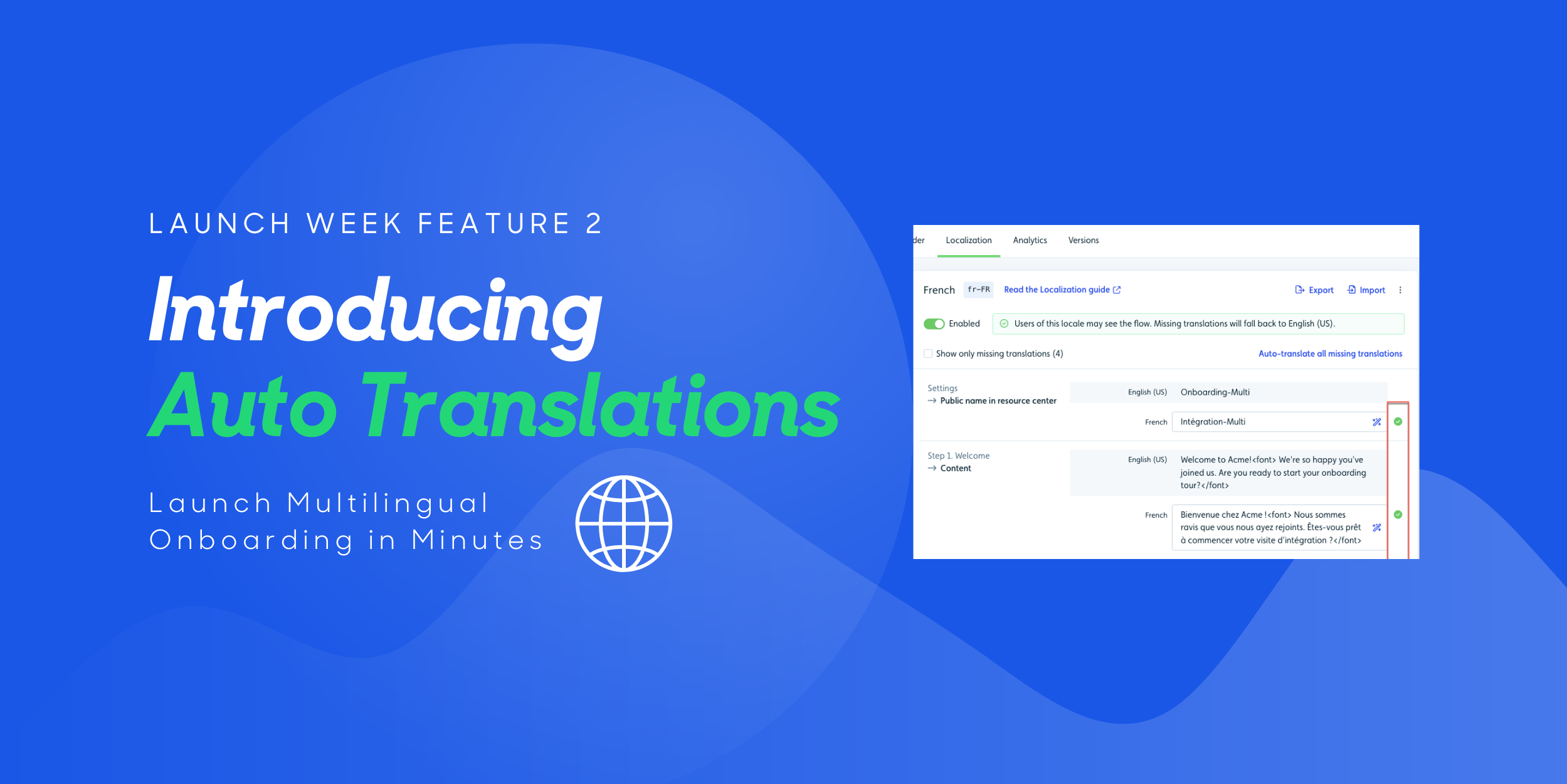
🎉 We just launched 3 new features! Find out more:

Debugger
AI Translation
AI Rephrase
blog single image
blog single image
What's New

Launch Multilingual Onboarding in Minutes with Userflow Auto (AI) Translations

blog author
Jinwoo Park

August 18, 2025

You’ve nailed your onboarding flow, but now your product is going global. Suddenly, you’re stuck copy-pasting text into spreadsheets, juggling translation files, and waiting days (or even weeks) for localized content to come back.

That’s why for anyone with global ambitions, this feature is an absolute must. 

Introducing: Userflow Auto (AI) Translations. Skip the painful back-and-forth and launch a polished, localized onboarding experience in minutes, all within Userflow.

What Is Userflow Auto (AI) Translations?

Userflow’s AI translation feature is built directly into your onboarding toolkit. No external software. No manual processes. Just instant, contextual translations that keep up with your product.

Here’s what it can do:

  • AI-powered localization – Translate flows, checklists, surveys, and more instantly

  • Automatic detection – Finds and fills in missing translations across all supported languages

  • Smart updates – Refreshes translations whenever you edit the original copy

  • Contextual accuracy – Keeps tone, clarity, and brand voice intact


Why It Matters

Expanding into new markets should be exciting, not a logistical nightmare. Localization delays slow down launches, increase costs, and risk delivering a subpar experience for new users.

Auto (AI) Translations flips the script.

  • Save hours (or days) – No more copy-paste marathons or slow vendor turnarounds

  • Reduce costs – Cut out expensive localization services for onboarding content

  • Launch faster – Go from single-language to fully localized in a single day

  • Deliver consistent UX – Every user sees a polished, in-language onboarding experience from day one


How to Start Using Auto (AI) Translations

With this new feature from Userflow, you can go global in just a few clicks:

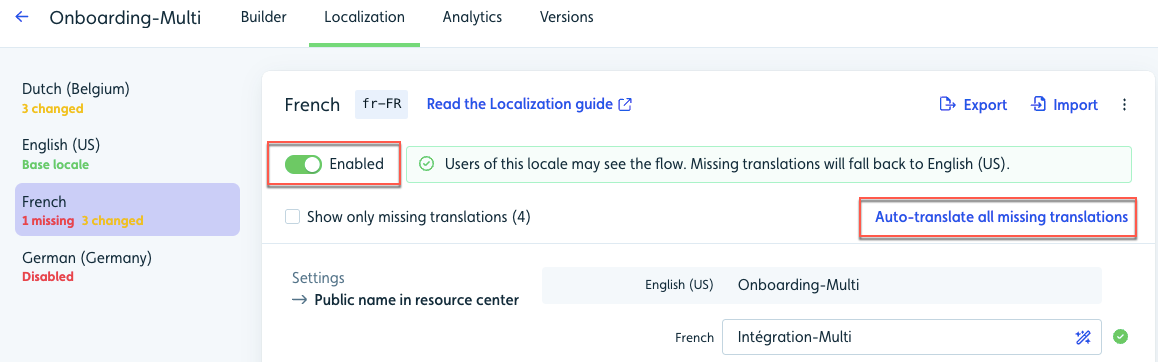
  1. In Localization for your flow or other content, enable the language(s) you want to translate

  2. Select Auto-translate all missing translations

  3. Let AI fill in missing text and update translations when the original content changes

  4. Review and edit translations if you want to fine-tune tone or phrasing

  5. Publish your updated multilingual content — and give users a seamless localized experience instantly
Find out more on our help doc

Go Global With Confidence

At Userflow, our mission is to help you create onboarding experiences that are fast to build, easy to manage, and loved by users everywhere. Auto (AI) Translations is a massive step toward that goal, by empowering you to reach more users, in more places, without slowing your team down.

Already a Userflow customer? Try Auto (AI) Translations today and start shipping multilingual onboarding the same day.

Not on Userflow yet? Now’s your moment to go global without the growing pains.

Sign In / Start Free Trial

PS. Need to extend or reactivate your Userflow trial? Email support@userflow.com and we’ll get you set up so you can explore our Launch Week features.

2 min 33 sec. read

blog single image
What's New

Launch Multilingual Onboarding in Minutes with Userflow Auto (AI) Translations

blog author
Jinwoo Park

August 18, 2025

You’ve nailed your onboarding flow, but now your product is going global. Suddenly, you’re stuck copy-pasting text into spreadsheets, juggling translation files, and waiting days (or even weeks) for localized content to come back.

That’s why for anyone with global ambitions, this feature is an absolute must. 

Introducing: Userflow Auto (AI) Translations. Skip the painful back-and-forth and launch a polished, localized onboarding experience in minutes, all within Userflow.

What Is Userflow Auto (AI) Translations?

Userflow’s AI translation feature is built directly into your onboarding toolkit. No external software. No manual processes. Just instant, contextual translations that keep up with your product.

Here’s what it can do:

  • AI-powered localization – Translate flows, checklists, surveys, and more instantly

  • Automatic detection – Finds and fills in missing translations across all supported languages

  • Smart updates – Refreshes translations whenever you edit the original copy

  • Contextual accuracy – Keeps tone, clarity, and brand voice intact


Why It Matters

Expanding into new markets should be exciting, not a logistical nightmare. Localization delays slow down launches, increase costs, and risk delivering a subpar experience for new users.

Auto (AI) Translations flips the script.

  • Save hours (or days) – No more copy-paste marathons or slow vendor turnarounds

  • Reduce costs – Cut out expensive localization services for onboarding content

  • Launch faster – Go from single-language to fully localized in a single day

  • Deliver consistent UX – Every user sees a polished, in-language onboarding experience from day one


How to Start Using Auto (AI) Translations

With this new feature from Userflow, you can go global in just a few clicks:

  1. In Localization for your flow or other content, enable the language(s) you want to translate

  2. Select Auto-translate all missing translations

  3. Let AI fill in missing text and update translations when the original content changes

  4. Review and edit translations if you want to fine-tune tone or phrasing

  5. Publish your updated multilingual content — and give users a seamless localized experience instantly

Find out more on our help doc

Go Global With Confidence

At Userflow, our mission is to help you create onboarding experiences that are fast to build, easy to manage, and loved by users everywhere. Auto (AI) Translations is a massive step toward that goal, by empowering you to reach more users, in more places, without slowing your team down.

Already a Userflow customer? Try Auto (AI) Translations today and start shipping multilingual onboarding the same day.

Not on Userflow yet? Now’s your moment to go global without the growing pains.

Sign In / Start Free Trial

PS. Need to extend or reactivate your Userflow trial? Email support@userflow.com and we’ll get you set up so you can explore our Launch Week features.

2 min 33 sec. read

You’ve nailed your onboarding flow, but now your product is going global. Suddenly, you’re stuck copy-pasting text into spreadsheets, juggling translation files, and waiting days (or even weeks) for localized content to come back.

That’s why for anyone with global ambitions, this feature is an absolute must. 

Introducing: Userflow Auto (AI) Translations. Skip the painful back-and-forth and launch a polished, localized onboarding experience in minutes, all within Userflow.

What Is Userflow Auto (AI) Translations?

Userflow’s AI translation feature is built directly into your onboarding toolkit. No external software. No manual processes. Just instant, contextual translations that keep up with your product.

Here’s what it can do:

  • AI-powered localization – Translate flows, checklists, surveys, and more instantly

  • Automatic detection – Finds and fills in missing translations across all supported languages

  • Smart updates – Refreshes translations whenever you edit the original copy

  • Contextual accuracy – Keeps tone, clarity, and brand voice intact


Why It Matters

Expanding into new markets should be exciting, not a logistical nightmare. Localization delays slow down launches, increase costs, and risk delivering a subpar experience for new users.

Auto (AI) Translations flips the script.

  • Save hours (or days) – No more copy-paste marathons or slow vendor turnarounds

  • Reduce costs – Cut out expensive localization services for onboarding content

  • Launch faster – Go from single-language to fully localized in a single day

  • Deliver consistent UX – Every user sees a polished, in-language onboarding experience from day one


How to Start Using Auto (AI) Translations

With this new feature from Userflow, you can go global in just a few clicks:

  1. In Localization for your flow or other content, enable the language(s) you want to translate

  2. Select Auto-translate all missing translations

  3. Let AI fill in missing text and update translations when the original content changes

  4. Review and edit translations if you want to fine-tune tone or phrasing

  5. Publish your updated multilingual content — and give users a seamless localized experience instantly

Find out more on our help doc

Go Global With Confidence

At Userflow, our mission is to help you create onboarding experiences that are fast to build, easy to manage, and loved by users everywhere. Auto (AI) Translations is a massive step toward that goal, by empowering you to reach more users, in more places, without slowing your team down.

Already a Userflow customer? Try Auto (AI) Translations today and start shipping multilingual onboarding the same day.

Not on Userflow yet? Now’s your moment to go global without the growing pains.

Sign In / Start Free Trial

PS. Need to extend or reactivate your Userflow trial? Email support@userflow.com and we’ll get you set up so you can explore our Launch Week features.

About the author

blog author
Jinwoo Park

Userflow

Content Marketing Manager at Userflow

Jinwoo Park leads content strategy at Userflow, where he writes about onboarding, user engagement, and product-led growth. His work blends storytelling and strategy to help SaaS teams design smoother onboarding experiences and build products users love from day one. He holds a master’s in Creative Writing from the University of Oxford and is also a published novelist.

Effortless Onboarding,
Powerful Results

Try the most-loved user onboarding product on the market.

CASE STUDIES

All case studies
iconicon

Klevu

a case study

How Klevu Enhanced Adoption and Reduced Time-to-Value by 50% with Userflow

Learn how
iconicon

Evocalize

a case study

How Evocalize Boosted Product Adoption and Engagement With Userflow 

Learn how
iconicon

Visma Dinero

a case study

How Visma Dinero provides 24/7 onboarding and support with in-app content and AI Assistant.

Learn how
iconicon