
🎉 We just launched 3 new features! Find out more:

Debugger
AI Translation
AI Rephrase
blog single image
blog single image

The Onboarding Power Trio: Heap + Salesforce + Userflow Integration Use Cases

blog author

September 22, 2025

Getting new users through the door is one thing. Making sure they adopt your product, stay engaged, and grow with you? That's a whole other can of worms. That moment when a customer finds value, avoids churn, or expands into new features is always the result of aligning the right insights with the right actions.

To get there, you need clear product analytics, rich customer context, and in-app guidance that can act in real time. What you need instead is a best-in-class setup where each tool does what it’s best at, then works seamlessly together.

That’s exactly what happens when you integrate Heap, Salesforce, and Userflow. This powerful trio of tools creates a feedback loop that integrates  product behavior, customer data, and guided user experiences into a single streamlined workflow.

So let’s dive into how this works, and how you can configure it to supercharge retention, expansion, and customer success with this trio of connected tools.

‍

What Each Tool Does Best

Before we pull back the curtain on this integration magic, let’s meet the three tools that make it all possible. 

Userflow: Personalized In-App Onboarding
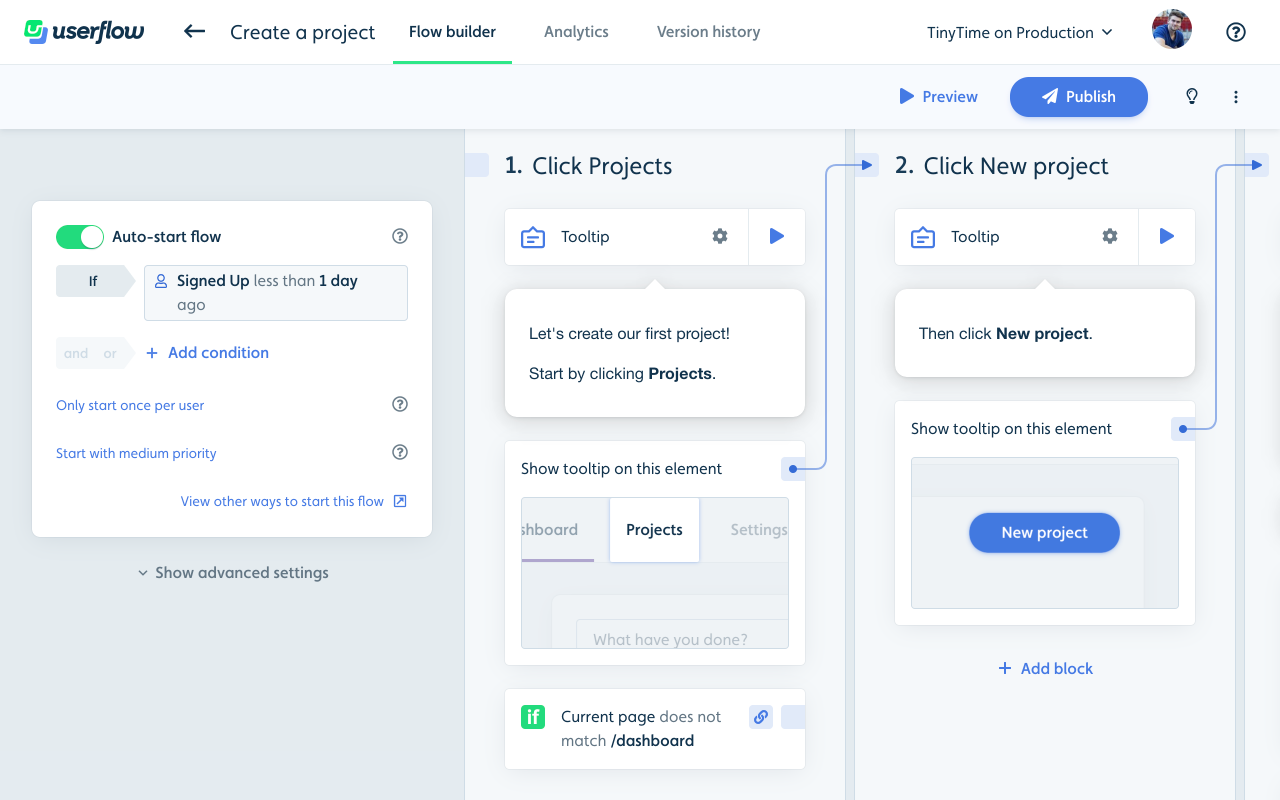
  • Quickly builds no-code product tours, checklists, tooltips, and surveys

  • Triggers flows based on user attributes and behaviors

  • Supports advanced features like A/B tests, localization, multiple environments, and more

  • Sends events to external tools or responds to CRM and analytics data in real time

Heap: Automatic Behavioral Analytics

  • Auto-captures every user interaction inside your product

  • Identifies drop-off points, adoption stalls, and friction in onboarding

  • Defines behavioral cohorts based on engagement or inactivity

  • Helps teams monitor product usage across the entire funnel

Salesforce: CRM + Customer Context

  • Stores detailed account and contact data (plan type, industry, lifecycle stage)

  • Automates workflows for sales and customer success teams

  • Surfaces usage insights on account records and dashboards

  • Syncs with product tools to connect adoption signals with revenue impact

‍

How Each Integration Pair Works

Now that we know the individual tools, it’s time to talk about how each pair connects, because understanding the pairs is key to seeing how the full Heap, Salesforce, and Userflow integration works together.

Userflow + Heap Integration

  • Continuously stream Userflow events (e.g., “Onboarding Checklist Completed,” “Tooltip Viewed”) into Heap for adoption analysis

  • Sync Heap cohorts (e.g., “Stalled Users,” “Active PQLs”) back into Userflow to deliver tailored flows

  • Use Heap to measure whether Userflow flows improved feature adoption and retention

Userflow + Salesforce Integration

  • Pull Salesforce properties (plan type, industry, renewal date, sales owner) into Userflow to personalize onboarding

  • Stream Userflow events into Salesforce as timeline activity, giving CSMs and sales reps visibility into in-app behavior

  • Use Salesforce workflows to trigger outreach based on Userflow milestones

Heap + Salesforce Integration

  • Sync Heap usage data into Salesforce to enrich account records with behavioral context

  • Surface product-qualified lead signals directly in Salesforce for sales teams

  • Connect usage drops to renewal timelines, enabling proactive CS action

‍

Use Cases for the Userflow-Heap-Salesforce Integration

With the basics behind us, here’s where things get interesting: the powerful possibilities that emerge when you integrate Heap, Salesforce, and Userflow together.

Real-World Use Case 1: Personalized Onboarding & Guidance

Scenario:
A new enterprise customer signs, but hasn’t completed product setup.

How It Works:

  • Heap detects missing setup actions (e.g., no API key installed).

  • Salesforce confirms account type and lifecycle stage.

  • Salesforce → Userflow: Triggers a tailored onboarding flow just for enterprise users.

  • Userflow → Heap + Salesforce: Tracks completion progress for product and CS visibility.

Real-World Use Case 2: Proactive Customer Success Interventions

Scenario:
An account’s usage is dropping, and renewal is approaching.

How It Works:

  • Heap flags declining weekly usage.

  • Salesforce ties the account to a renewal date.

  • Userflow → End users: Launches tutorials or re-engagement nudges.

  • If unaddressed, Salesforce creates a task for the assigned CSM to follow up.

Real-World Use Case 3: Data-Driven Upsell & Expansion

Scenario:
Users hit usage limits and demonstrate upgrade interest (e.g., repeated billing page views) 

How It Works:

  • Heap detects thresholds reached (e.g., dashboard limit reached).

  • Heap → Salesforce: Flags the account as an upsell candidate.

  • Salesforce → Userflow: Triggers an in-app upgrade message.

  • Userflow → Salesforce: Logs engagement for sales to follow up.

Real-World Use Case 4: Closed-Loop Feedback for Product & Sales

Scenario:
A new feature is underperforming in adoption.

How It Works:

  • Heap shows low usage of a new reporting dashboard.

  • Userflow → End users: Launches a tooltip walkthrough to encourage adoption.

  • Userflow → Salesforce: Logs who engaged with the flow.

  • Salesforce ties adoption to NPS or renewal outcomes, closing the loop for product and sales.

Real-World Use Case 5: Customer Journey Mapping Across Teams

Scenario:
Multiple teams need a single view of where a customer is in their journey.

How It Works:

  • Salesforce: Marks the account as “In Onboarding.”

  • Heap: Shows which steps have been completed.

  • Userflow: Logs which onboarding flows were triggered or skipped.

  • Together: CSMs see exactly where users are stuck and step in with context.

‍

Get Started With the Ultimate Customer Success Integration Setup

These use cases are just the beginning of what’s possible with a Heap-Userflow-Salesforce integration, but they’re a strong starting point. Once you see how these three tools connect, you’ll be able to build even more creative workflows—whether it’s saving at-risk accounts, unlocking expansion, or giving every team a unified view of the customer journey.

The best part? You can set it all up without waiting on your developers. With no-code, real-time integrations, your product, CS, and sales teams can act faster and stay aligned—while your engineers stay focused on higher-value projects.

So get started right now. Integrate Heap, Salesforce, and Userflow, and turn insight into action at every stage of the customer lifecycle.

Sign up for your free trial today.

‍

2 min 33 sec. read

blog single image

The Onboarding Power Trio: Heap + Salesforce + Userflow Integration Use Cases

blog author

September 22, 2025

Getting new users through the door is one thing. Making sure they adopt your product, stay engaged, and grow with you? That's a whole other can of worms. That moment when a customer finds value, avoids churn, or expands into new features is always the result of aligning the right insights with the right actions.

To get there, you need clear product analytics, rich customer context, and in-app guidance that can act in real time. What you need instead is a best-in-class setup where each tool does what it’s best at, then works seamlessly together.

That’s exactly what happens when you integrate Heap, Salesforce, and Userflow. This powerful trio of tools creates a feedback loop that integrates  product behavior, customer data, and guided user experiences into a single streamlined workflow.

So let’s dive into how this works, and how you can configure it to supercharge retention, expansion, and customer success with this trio of connected tools.

‍

What Each Tool Does Best

Before we pull back the curtain on this integration magic, let’s meet the three tools that make it all possible. 

Userflow: Personalized In-App Onboarding

  • Quickly builds no-code product tours, checklists, tooltips, and surveys

  • Triggers flows based on user attributes and behaviors

  • Supports advanced features like A/B tests, localization, multiple environments, and more

  • Sends events to external tools or responds to CRM and analytics data in real time

Heap: Automatic Behavioral Analytics

  • Auto-captures every user interaction inside your product

  • Identifies drop-off points, adoption stalls, and friction in onboarding

  • Defines behavioral cohorts based on engagement or inactivity

  • Helps teams monitor product usage across the entire funnel

Salesforce: CRM + Customer Context

  • Stores detailed account and contact data (plan type, industry, lifecycle stage)

  • Automates workflows for sales and customer success teams

  • Surfaces usage insights on account records and dashboards

  • Syncs with product tools to connect adoption signals with revenue impact

‍

How Each Integration Pair Works

Now that we know the individual tools, it’s time to talk about how each pair connects, because understanding the pairs is key to seeing how the full Heap, Salesforce, and Userflow integration works together.

Userflow + Heap Integration

  • Continuously stream Userflow events (e.g., “Onboarding Checklist Completed,” “Tooltip Viewed”) into Heap for adoption analysis

  • Sync Heap cohorts (e.g., “Stalled Users,” “Active PQLs”) back into Userflow to deliver tailored flows

  • Use Heap to measure whether Userflow flows improved feature adoption and retention

Userflow + Salesforce Integration

  • Pull Salesforce properties (plan type, industry, renewal date, sales owner) into Userflow to personalize onboarding

  • Stream Userflow events into Salesforce as timeline activity, giving CSMs and sales reps visibility into in-app behavior

  • Use Salesforce workflows to trigger outreach based on Userflow milestones

Heap + Salesforce Integration

  • Sync Heap usage data into Salesforce to enrich account records with behavioral context

  • Surface product-qualified lead signals directly in Salesforce for sales teams

  • Connect usage drops to renewal timelines, enabling proactive CS action

‍

Use Cases for the Userflow-Heap-Salesforce Integration

With the basics behind us, here’s where things get interesting: the powerful possibilities that emerge when you integrate Heap, Salesforce, and Userflow together.

Real-World Use Case 1: Personalized Onboarding & Guidance

Scenario:
A new enterprise customer signs, but hasn’t completed product setup.

How It Works:

  • Heap detects missing setup actions (e.g., no API key installed).

  • Salesforce confirms account type and lifecycle stage.

  • Salesforce → Userflow: Triggers a tailored onboarding flow just for enterprise users.

  • Userflow → Heap + Salesforce: Tracks completion progress for product and CS visibility.

Real-World Use Case 2: Proactive Customer Success Interventions

Scenario:
An account’s usage is dropping, and renewal is approaching.

How It Works:

  • Heap flags declining weekly usage.

  • Salesforce ties the account to a renewal date.

  • Userflow → End users: Launches tutorials or re-engagement nudges.

  • If unaddressed, Salesforce creates a task for the assigned CSM to follow up.

Real-World Use Case 3: Data-Driven Upsell & Expansion

Scenario:
Users hit usage limits and demonstrate upgrade interest (e.g., repeated billing page views) 

How It Works:

  • Heap detects thresholds reached (e.g., dashboard limit reached).

  • Heap → Salesforce: Flags the account as an upsell candidate.

  • Salesforce → Userflow: Triggers an in-app upgrade message.

  • Userflow → Salesforce: Logs engagement for sales to follow up.

Real-World Use Case 4: Closed-Loop Feedback for Product & Sales

Scenario:
A new feature is underperforming in adoption.

How It Works:

  • Heap shows low usage of a new reporting dashboard.

  • Userflow → End users: Launches a tooltip walkthrough to encourage adoption.

  • Userflow → Salesforce: Logs who engaged with the flow.

  • Salesforce ties adoption to NPS or renewal outcomes, closing the loop for product and sales.

Real-World Use Case 5: Customer Journey Mapping Across Teams

Scenario:
Multiple teams need a single view of where a customer is in their journey.

How It Works:

  • Salesforce: Marks the account as “In Onboarding.”

  • Heap: Shows which steps have been completed.

  • Userflow: Logs which onboarding flows were triggered or skipped.

  • Together: CSMs see exactly where users are stuck and step in with context.

‍

Get Started With the Ultimate Customer Success Integration Setup

These use cases are just the beginning of what’s possible with a Heap-Userflow-Salesforce integration, but they’re a strong starting point. Once you see how these three tools connect, you’ll be able to build even more creative workflows—whether it’s saving at-risk accounts, unlocking expansion, or giving every team a unified view of the customer journey.

The best part? You can set it all up without waiting on your developers. With no-code, real-time integrations, your product, CS, and sales teams can act faster and stay aligned—while your engineers stay focused on higher-value projects.

So get started right now. Integrate Heap, Salesforce, and Userflow, and turn insight into action at every stage of the customer lifecycle.

Sign up for your free trial today.

‍

2 min 33 sec. read

Getting new users through the door is one thing. Making sure they adopt your product, stay engaged, and grow with you? That's a whole other can of worms. That moment when a customer finds value, avoids churn, or expands into new features is always the result of aligning the right insights with the right actions.

To get there, you need clear product analytics, rich customer context, and in-app guidance that can act in real time. What you need instead is a best-in-class setup where each tool does what it’s best at, then works seamlessly together.

That’s exactly what happens when you integrate Heap, Salesforce, and Userflow. This powerful trio of tools creates a feedback loop that integrates  product behavior, customer data, and guided user experiences into a single streamlined workflow.

So let’s dive into how this works, and how you can configure it to supercharge retention, expansion, and customer success with this trio of connected tools.

‍

What Each Tool Does Best

Before we pull back the curtain on this integration magic, let’s meet the three tools that make it all possible. 

Userflow: Personalized In-App Onboarding

  • Quickly builds no-code product tours, checklists, tooltips, and surveys

  • Triggers flows based on user attributes and behaviors

  • Supports advanced features like A/B tests, localization, multiple environments, and more

  • Sends events to external tools or responds to CRM and analytics data in real time

Heap: Automatic Behavioral Analytics

  • Auto-captures every user interaction inside your product

  • Identifies drop-off points, adoption stalls, and friction in onboarding

  • Defines behavioral cohorts based on engagement or inactivity

  • Helps teams monitor product usage across the entire funnel

Salesforce: CRM + Customer Context

  • Stores detailed account and contact data (plan type, industry, lifecycle stage)

  • Automates workflows for sales and customer success teams

  • Surfaces usage insights on account records and dashboards

  • Syncs with product tools to connect adoption signals with revenue impact

‍

How Each Integration Pair Works

Now that we know the individual tools, it’s time to talk about how each pair connects, because understanding the pairs is key to seeing how the full Heap, Salesforce, and Userflow integration works together.

Userflow + Heap Integration

  • Continuously stream Userflow events (e.g., “Onboarding Checklist Completed,” “Tooltip Viewed”) into Heap for adoption analysis

  • Sync Heap cohorts (e.g., “Stalled Users,” “Active PQLs”) back into Userflow to deliver tailored flows

  • Use Heap to measure whether Userflow flows improved feature adoption and retention

Userflow + Salesforce Integration

  • Pull Salesforce properties (plan type, industry, renewal date, sales owner) into Userflow to personalize onboarding

  • Stream Userflow events into Salesforce as timeline activity, giving CSMs and sales reps visibility into in-app behavior

  • Use Salesforce workflows to trigger outreach based on Userflow milestones

Heap + Salesforce Integration

  • Sync Heap usage data into Salesforce to enrich account records with behavioral context

  • Surface product-qualified lead signals directly in Salesforce for sales teams

  • Connect usage drops to renewal timelines, enabling proactive CS action

‍

Use Cases for the Userflow-Heap-Salesforce Integration

With the basics behind us, here’s where things get interesting: the powerful possibilities that emerge when you integrate Heap, Salesforce, and Userflow together.

Real-World Use Case 1: Personalized Onboarding & Guidance

Scenario:
A new enterprise customer signs, but hasn’t completed product setup.

How It Works:

  • Heap detects missing setup actions (e.g., no API key installed).

  • Salesforce confirms account type and lifecycle stage.

  • Salesforce → Userflow: Triggers a tailored onboarding flow just for enterprise users.

  • Userflow → Heap + Salesforce: Tracks completion progress for product and CS visibility.

Real-World Use Case 2: Proactive Customer Success Interventions

Scenario:
An account’s usage is dropping, and renewal is approaching.

How It Works:

  • Heap flags declining weekly usage.

  • Salesforce ties the account to a renewal date.

  • Userflow → End users: Launches tutorials or re-engagement nudges.

  • If unaddressed, Salesforce creates a task for the assigned CSM to follow up.

Real-World Use Case 3: Data-Driven Upsell & Expansion

Scenario:
Users hit usage limits and demonstrate upgrade interest (e.g., repeated billing page views) 

How It Works:

  • Heap detects thresholds reached (e.g., dashboard limit reached).

  • Heap → Salesforce: Flags the account as an upsell candidate.

  • Salesforce → Userflow: Triggers an in-app upgrade message.

  • Userflow → Salesforce: Logs engagement for sales to follow up.

Real-World Use Case 4: Closed-Loop Feedback for Product & Sales

Scenario:
A new feature is underperforming in adoption.

How It Works:

  • Heap shows low usage of a new reporting dashboard.

  • Userflow → End users: Launches a tooltip walkthrough to encourage adoption.

  • Userflow → Salesforce: Logs who engaged with the flow.

  • Salesforce ties adoption to NPS or renewal outcomes, closing the loop for product and sales.

Real-World Use Case 5: Customer Journey Mapping Across Teams

Scenario:
Multiple teams need a single view of where a customer is in their journey.

How It Works:

  • Salesforce: Marks the account as “In Onboarding.”

  • Heap: Shows which steps have been completed.

  • Userflow: Logs which onboarding flows were triggered or skipped.

  • Together: CSMs see exactly where users are stuck and step in with context.

‍

Get Started With the Ultimate Customer Success Integration Setup

These use cases are just the beginning of what’s possible with a Heap-Userflow-Salesforce integration, but they’re a strong starting point. Once you see how these three tools connect, you’ll be able to build even more creative workflows—whether it’s saving at-risk accounts, unlocking expansion, or giving every team a unified view of the customer journey.

The best part? You can set it all up without waiting on your developers. With no-code, real-time integrations, your product, CS, and sales teams can act faster and stay aligned—while your engineers stay focused on higher-value projects.

So get started right now. Integrate Heap, Salesforce, and Userflow, and turn insight into action at every stage of the customer lifecycle.

Sign up for your free trial today.

‍

About the author

Effortless Onboarding,
Powerful Results

Try the most-loved user onboarding product on the market.

CASE STUDIES

All case studies
iconicon

Klevu

a case study

How Klevu Enhanced Adoption and Reduced Time-to-Value by 50% with Userflow

Learn how
iconicon

Evocalize

a case study

How Evocalize Boosted Product Adoption and Engagement With Userflow 

Learn how
iconicon

Visma Dinero

a case study

How Visma Dinero provides 24/7 onboarding and support with in-app content and AI Assistant.

Learn how
iconicon